
Custom HubSpot API Integrations for Any Business System
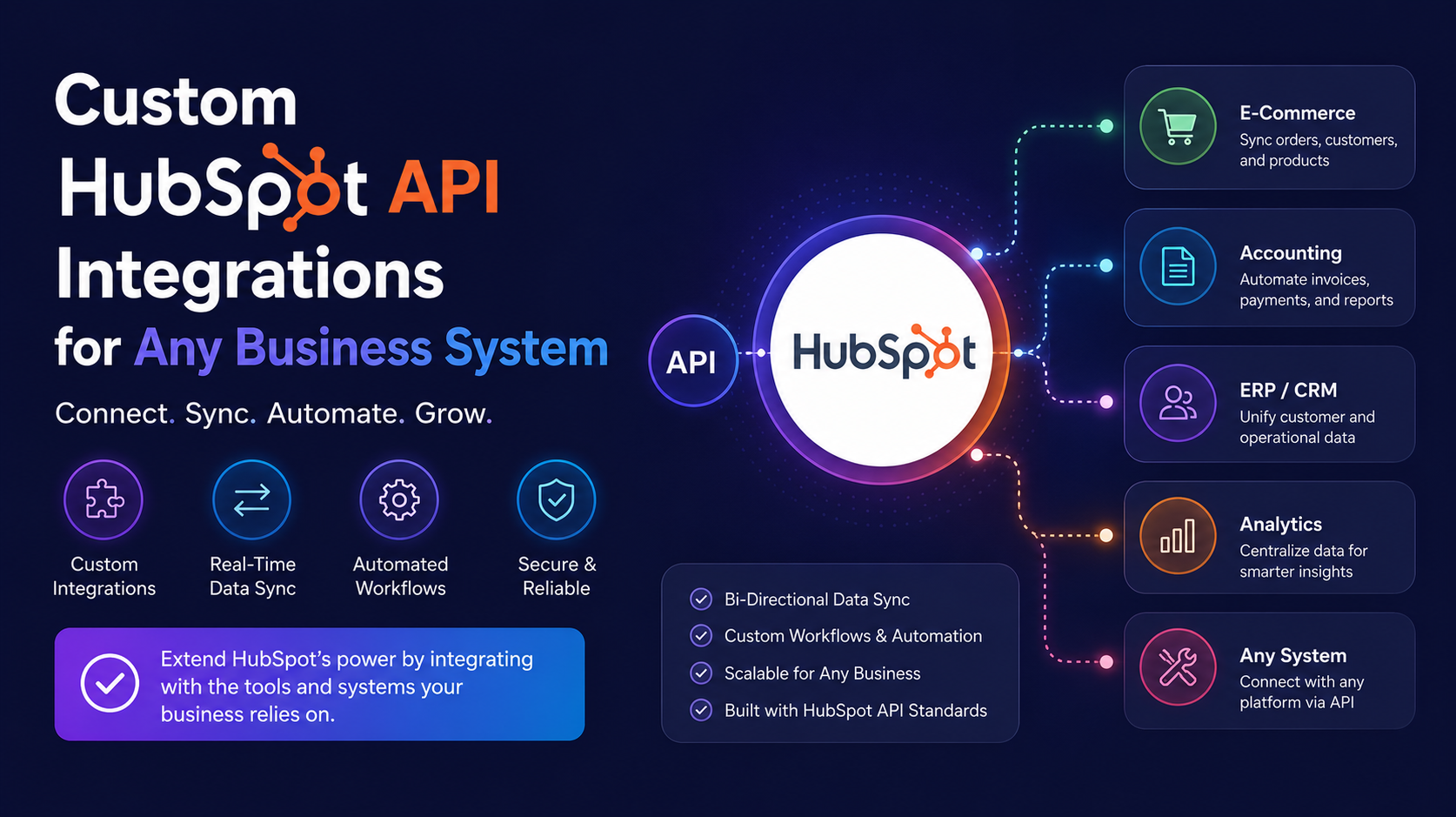
Connect HubSpot with your ERP, accounting software, payment gateway, inventory platform, or custom business application using secure API integrations. Whether you need a native connector, middleware, or a fully custom solution, we build reliable integrations that automate data flow, eliminate manual work, and keep every system synchronized.
The Challenge
Many business-critical systems don’t offer a native HubSpot integration. Customer data becomes trapped in separate platforms, employees manually transfer information between applications, and reporting becomes inconsistent across departments.
Our custom HubSpot integrations remove these barriers by securely connecting your systems, automating data exchange, and ensuring every team works from accurate, up-to-date information.
Integration Options
Native HubSpot Integrations
Where supported, we configure official integrations and optimize field mapping, workflows, and synchronization rules for your business.
Middleware Integrations
Using platforms like Make, we connect applications that don’t have native integrations while adding business logic, data transformations, approvals, and automation.
Custom API Development
For complex or proprietary systems, we build fully custom API integrations using HubSpot APIs to create secure, scalable, and high-performance connections.
Systems We Connect
Enterprise Resource Planning (ERP)
Synchronize customers, products, orders, invoices, pricing, inventory, and financial data.
Accounting Platforms
Connect invoices, payments, billing information, tax details, and customer accounts.
Payment Gateways
Automatically update payment status, subscriptions, refunds, transactions, and customer billing information.
Inventory & Warehouse Management
Keep stock levels, product availability, warehouses, and fulfillment information synchronized.
Logistics & Shipping Platforms
Automate shipment tracking, delivery updates, fulfillment status, and order notifications.
Custom Business Applications
Integrate internal portals, legacy software, customer databases, booking systems, and proprietary business tools.
Business Intelligence & Data Warehouses
Feed CRM data into reporting platforms for advanced analytics, dashboards, forecasting, and executive reporting.
What Every Integration Includes
Custom Field Mapping
Ensure the correct data is synchronized between systems with accurate property mapping.
Two-Way Synchronization
Keep HubSpot and your business systems updated automatically in both directions where required.
Intelligent Data Transformation
Convert formats, validate information, and apply business rules before data is synchronized.
Error Handling & Automatic Retries
Failed transactions are detected, logged, and retried automatically to maximize reliability.
Monitoring & Logging
Track every integration event with detailed logs, alerts, and performance monitoring.
Security & Authentication
Implement secure API authentication, encryption, and access controls to protect your business data.
Documentation
Receive complete technical and functional documentation for future maintenance and scalability.
Our Integration Process
1. Discovery & Solution Design
Understand your systems, workflows, business goals, and integration requirements.
2. Architecture Planning
Define data flow, APIs, field mappings, automation rules, and security requirements.
3. Development
Build the integration using the most appropriate approach—native connectors, middleware, or custom APIs.
4. Testing & Quality Assurance
Validate every workflow, synchronization rule, and exception scenario before deployment.
5. Deployment & Support
Launch the integration with ongoing monitoring, optimization, maintenance, and technical support.
Frequently Asked Questions
Can HubSpot connect with our ERP or custom software?
Yes. If a native connector isn’t available, we develop custom API integrations or middleware solutions to connect HubSpot with virtually any business system.
Should we use a native integration, middleware, or a custom API?
It depends on your requirements. Native integrations are ideal when available, middleware provides flexibility for workflow automation, and custom APIs are best for complex or proprietary systems. We recommend the most reliable and cost-effective option.
Can data sync in both directions?
Yes. We configure one-way or two-way synchronization depending on your business processes and system capabilities.
How reliable are custom integrations?
Our integrations include automated retries, error handling, monitoring, logging, security controls, and documentation to ensure long-term reliability and maintainability.
How much does a custom HubSpot integration cost?
Pricing depends on system complexity, API availability, automation requirements, data volume, and integration scope. After a free CRM audit, we provide a fixed project proposal with transparent pricing.
Ready to Connect HubSpot with Your Business Systems?
Whether you need to integrate an ERP, accounting platform, payment gateway, inventory system, or proprietary application, we’ll design a secure, scalable HubSpot integration tailored to your business. Book a free CRM audit and discover the best integration approach for your organization.
Connect HubSpot with ClickSend to automate SMS communication throughout your customer journey. Trigger text messages from HubSpot workflows, lifecycle stages, deal stages, and custom automation while tracking every message, reply, and delivery status directly within your CRM.
The Problem
SMS has one of the highest engagement rates, but when your messaging platform operates separately from HubSpot, your team loses visibility and automation opportunities. Customer conversations become fragmented, manual messaging increases, and follow-ups are inconsistent.
A properly configured HubSpot ClickSend integration brings SMS into your CRM, allowing every message to be automated, personalized, and tracked alongside your email, calls, and sales activities.
What You Can Automate
Appointment Reminders
Automatically send reminder messages before meetings, consultations, and appointments to reduce no-shows.
Lead Follow-Up
Instantly text new leads after form submissions, quote requests, or demo bookings while engagement is highest.
Payment & Renewal Notifications
Send invoice reminders, payment confirmations, subscription renewals, and overdue payment alerts automatically.
Delivery & Service Updates
Keep customers informed with shipping notifications, service updates, and booking confirmations.
Sales Follow-Ups
Automatically notify prospects after deal stage changes, proposal delivery, or scheduled follow-up tasks.
Re-Engagement Campaigns
Reconnect with inactive leads and customers using targeted SMS campaigns triggered by HubSpot workflows.
Key Benefits
SMS Inside HubSpot
Manage email, calls, and SMS from a single customer timeline.
Workflow Automation
Trigger personalized text messages using HubSpot workflows, lifecycle stages, custom properties, and deal pipelines.
Complete Message Tracking
View SMS delivery reports, replies, and communication history directly on each contact record.
Faster Customer Response
Reach customers instantly with high-open-rate SMS for time-sensitive communications.
Personalized Messaging
Automatically personalize SMS using HubSpot contact, company, and deal properties.
Reduce Manual Work
Automate repetitive messaging while ensuring consistent customer communication.
Our Integration Process
1. Requirements Discovery
Understand your customer journeys, messaging goals, and automation requirements.
2. ClickSend Configuration
Connect your ClickSend account securely with HubSpot and configure authentication.
3. Workflow Automation
Build SMS automation based on workflows, deal stages, lifecycle stages, and custom business rules.
4. Testing & Validation
Test message delivery, personalization, reply handling, and automation before deployment.
5. Launch & Ongoing Support
Deploy the integration, monitor performance, and optimize your SMS workflows as your business grows.
Frequently Asked Questions
Can I send SMS from HubSpot using ClickSend?
Yes. ClickSend can be integrated with HubSpot to automatically send SMS from workflows, deal stages, lifecycle stages, forms, and other CRM events.
What types of SMS can be automated?
You can automate appointment reminders, lead follow-ups, payment reminders, renewal notices, shipping updates, service notifications, marketing campaigns, and customer support messages.
Are SMS replies tracked in HubSpot?
Yes. SMS replies, delivery status, and message history can be logged on the HubSpot contact timeline, giving your team complete visibility into customer conversations.
Can SMS messages be personalized?
Absolutely. Messages can automatically include contact names, company details, appointment times, order information, and any HubSpot property using personalization tokens.
How much does a HubSpot ClickSend integration cost?
Pricing depends on your workflow complexity, automation requirements, and any custom integrations needed. After a free CRM audit, we provide a fixed implementation quote.